
TIIO (short for “The Internet Is Out”) is an offline-first media hub for music, video, podcasts, audiobooks, and other local libraries. It does not stream from outside catalogs. It scans folders you control and builds a media-center style interface around those files.
You still get search, home recommendations, playlists, artist views, and radios, but everything runs against your own indexed library and cached metadata. TIIO ships with its own UI framework, custom title bar, and utilities so it keeps working when CDNs or the wider internet are unreachable.
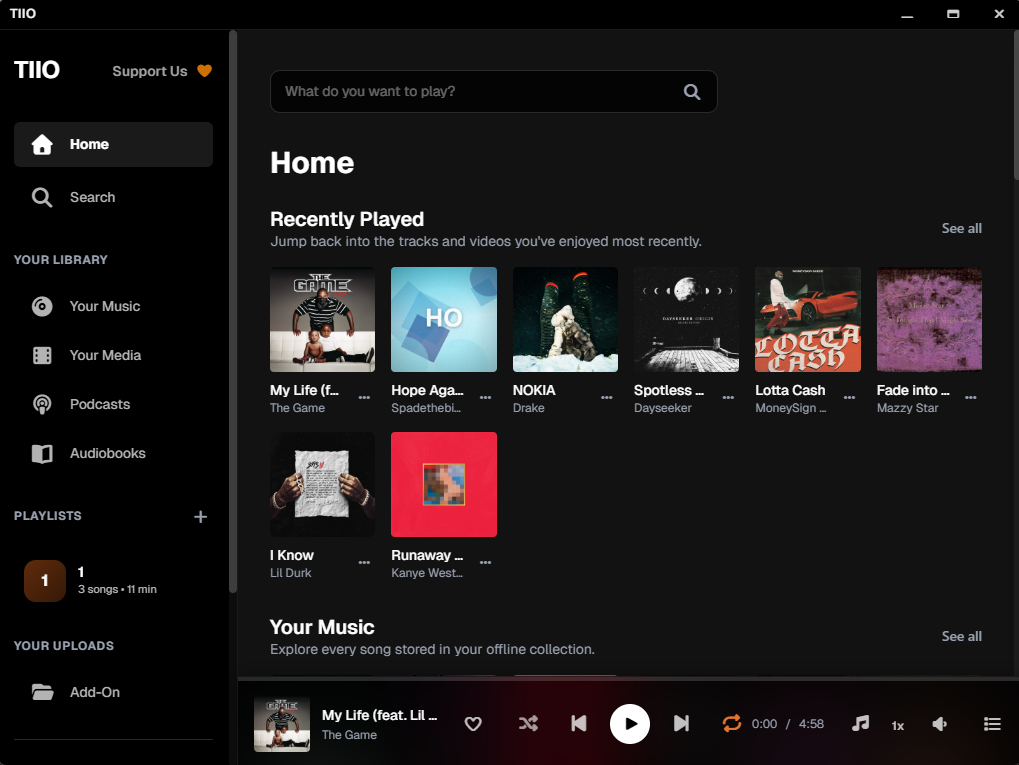
Meet TIIO
TIIO is a Windows desktop application that indexes the media collections you already own and wraps them in a modern, responsive experience. No cloud dependencies, no missing albums, just instant playback wherever you are.

Offline Playback That Feels Like Streaming
Core capabilities revolve around organizing and enjoying personal media collections. TIIO handles multiple content types side-by-side: traditional music albums, user videos, movies, TV episodes, podcasts, audiobooks, and flexible add-ons. It auto-builds shelves for recently played items, recents, playlists, and continue-watching; it offers per-mode layouts and search that spans your library - all generated from local metadata rather than remote APIs.
Because everything lives in local storage, libraries stay responsive, and your content remains private and portable. Artwork, artist overviews, radios, and other flourishes are generated from cached metadata, so the experience stays consistent even offline.
Core Features
TIIO understands music, video, movies, shows, podcasts, and audiobooks side-by-side. Scan your add-on folders once; TIIO keeps everything optimized and visually polished without touching the internet.
- Instant Offline Indexing: Dexie-backed indexing keeps metadata local and fast. Launch the app and every shelf, playlist, and search is ready without network calls.
- Unified Media Shelves: Music, videos, podcasts, audiobooks, and custom add-ons are displayed in adaptive grids. Switch between list, compact, or cinematic layouts.
- Howler + Plyr Playback: Advanced playback stacks deliver smooth gapless audio, quick scrubbing, and precise video controls, scaled to your offline library.
- Smart Favorites: Favorite, pin, or resume media instantly. TIIO remembers your state across sessions without syncing to the cloud.
- Desktop-Grade Shell: The Windows build includes a hardened Electron shell, native title bars, and local fallback assets to keep every panel consistent without internet access.
- Private By Design: No logins, telemetry, or remote licensing. Your archive stays local, portable, and under your control.
Why TIIO
What sets TIIO apart from giants like iTunes, Spotify, or SoundCloud is the philosophy: TIIO does not depend on corporate content catalogs, subscription DRM, or a persistent login. iTunes can manage local files, but it is intertwined with Apple IDs, cloud sync, and a store ecosystem. Spotify and SoundCloud are streaming-first; their value comes from massive centralized libraries, algorithmic discovery, and online connectivity. TIIO thrives offline, centers user-owned media, and treats add-on folders as the source of truth.
The payoff is clear if you are often disconnected, operating in air-gapped environments, or building a curated archive: quick local search, instant playback with no buffering, predictable availability, and zero risk that albums disappear due to rights changes. You can ingest rare recordings, long-form mixes, personal videos, or niche podcasts with the same polish as mainstream albums.
The trade-off is expected: there is no streaming catalog, social discovery, or automatic cloud backup - capabilities those mainstream platforms excel at. TIIO’s sweet spot is the self-sufficient collector or traveler who wants a modern interface for their own files rather than an endless online feed.
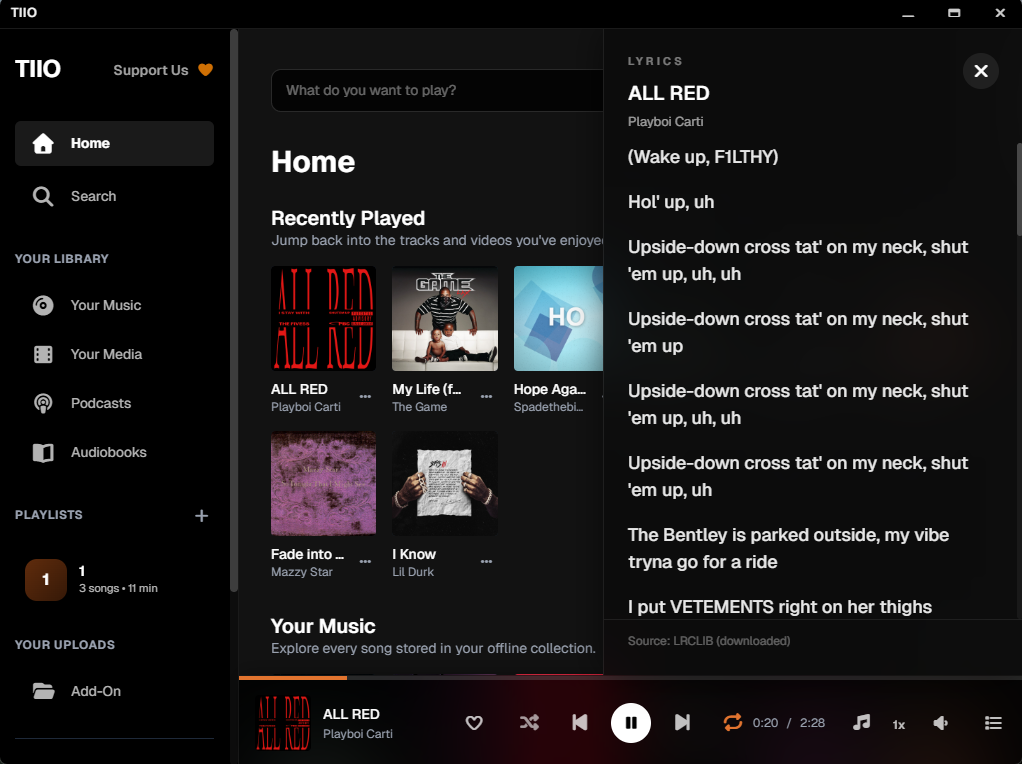
Live Context
Lyrics stay onboard, even when you are offline. TIIO keeps lyric sheets locally so you can read them inside the player without opening a browser or streaming service.
FAQ
Answers for teams adopting TIIO. Need more details? Reach out for custom builds, integration services, or enterprise licensing.
Does TIIO require an internet connection?
TIIO is designed to run entirely offline. The interface assets and playback stack are bundled locally, and the app never calls external APIs after installation.
Which operating systems are supported?
Windows builds are available now. Mac and Linux builds are in beta - join the waitlist to receive early access packages.
How are add-on folders managed?
Point TIIO at any directory. It indexes metadata without altering files, and you can re-run scans or pause indexing at any time.
Can I customize the interface?
Full theme customization is on our roadmap, but today the TIIO interface ships with a fixed palette so every install looks identical offline.
Is TIIO free?
TIIO beta is free to install and evaluate. Enterprise licensing and support packages are available on request.